Welcome to My Aadhaar UIDAI Portal Guide
Aadhaar Enrolment UIDAI 2026 – Book Aadhaar Appointment Online
Aadhaar enrolment is a voluntary process to create a verified digital identity for every resident of India. During enrolment, basic demographic details (name, address, and date of birth) and biometric information (fingerprints and iris scan) are safely collected to issue a tamper-proof and universally accepted Aadhaar number.
To begin the process, visit the nearest Aadhaar enrolment centre with the required documents. You may also book an online appointment from the UIDAI portal for faster processing and shorter waiting time.
Aadhaar Enrollment
Visit the Aadhaar center to book your appointment online for Aadhaar enrollment.
Aadhaar Enrolment (Complete Guide)
Aadhaar enrolment is a free and voluntary process for generating a 12-digit Aadhaar number from UIDAI. During enrolment, your demographic information (name, address, date of birth and gender) and biometric details (fingerprints, iris scans and a photograph) are securely recorded to create a verified identity. Once the Aadhaar number is assigned, you can download an e-Aadhaar or receive a physical Aadhaar card for identity verification across various services.
Aadhaar is not a proof of citizenship; it only establishes identity for residents of India.
Eligibility for Aadhaar Enrolment
Aadhaar enrolment is available to:
✔ Residents of India
Any individual who has lived in India for at least 182 days in the last 12 months, including:
- Indian citizens
- NRIs staying in India
- Foreign nationals with valid Indian residence documents under special conditions
✔ All Age Groups
Aadhaar can be issued to:
- Newborns and children
- Adults and senior citizens
For children below 5 years, a Baal Aadhaar (blue card) is issued. No biometrics are taken until they turn 5 years old. Updating biometrics becomes mandatory after age 5 and again after age 15.
✔ No Citizenship Requirement
Aadhaar proves identity for residents; it is not a proof of Indian nationality.
Prerequisites Before Enrolment
Before visiting an Aadhaar centre or booking an online appointment, ensure you have:
✔ Proof of Identity (PoI)
Documents that verify your name:
- PAN Card
- Passport
- Voter ID
- Ration Card
- Driving Licence
- Government-issued ID card
- School Leaving Certificate (SLC)
- Marriage certificate (with name)
✔ Proof of Address (PoA)
Documents confirming your residential address:
- Rental or lease agreement
- Utility bills (electricity, water, gas – not older than 3 months)
- Bank or post office passbook
- Voter ID or ration card
- Passport
- Driving licence
- Property tax receipt (not older than 1 year)
✔ Proof of Date of Birth (DoB)
Documents verifying date of birth:
- Birth certificate
- SSLC or school certificate
- Passport
- PAN card
If no supporting document is available, a valid self-declaration may be accepted.
✔ Registered Mobile Number
A mobile number is optional during enrolment, but highly recommended for OTP authentication while using future Aadhaar services online.
✔ Internet Connection (for Online Booking)
If booking an appointment online through UIDAI, ensure a stable internet connection.
Important: Enrolment Without Standard Documents
If you do not possess standard documents, you may still enrol using the Head of Family (HoF) method or the Introducer System, where a verified individual confirms your identity.
Documents Required for Aadhaar Enrolment
UIDAI accepts a wide range of documents. Ensure documents are:
- Valid
- Clear and readable
- Issued in your name
Proof of Relationship (PoR) — HoF Based Enrolment
If using HoF-based enrolment, any of the following may be required:
- Birth certificate (for children)
- Marriage certificate
- Public Distribution System (PDS) card
- MNREGA job card
- Ration card
Additional Notes
Children Below 5 Years
Only a photograph is required; biometric details are not collected. Aadhaar is linked to a parent or guardian’s Aadhaar number.
Foreign Nationals
A valid passport and OCI/PIO documents may be required depending on eligibility.
Incomplete Documents
If you cannot produce standard proofs, the Introducer or HoF-based methods may be used with supporting forms such as the Aadhaar enrolment/update certificate format.
Aadhaar Enrolment Methods (Complete Process Guide)
Aadhaar enrolment can be completed at Aadhaar Seva Kendras (ASKs) and Permanent Enrolment Centres (PECs) located across post offices, banks, and government organizations. Both allow walk-in visits and online appointments.
This guide shows each step clearly for faster enrolment.
1. Enrolment at Aadhaar Seva Kendra (ASK) or PEC
ASKs are managed by UIDAI, while PECs operate at verified local government points, post offices, and banks.
Locate a Nearby Centre
You can find the nearest ASK or PEC using:
- Aadhaar appointment portal ➜ https://appointments.uidai.gov.in
- UIDAI official website
- Helpline assistance via 1947
Locating a centre first ensures availability and avoids unnecessary travel.
Book an Appointment (Recommended)
Walk-ins are allowed, but booking reduces waiting time and ensures faster processing.
How to book:
- Open the UIDAI appointment portal
- Select your city/state and choose the nearest centre
- Pick an available slot
- Enter your mobile number and verify using OTP
- Confirm the appointment
Your appointment confirmation ensures dedicated processing time.
Visit the Centre
Carry:
- Original and photocopies of:
- PoI – Proof of Identity
- PoA – Proof of Address
- DoB – Date of Birth document
- For children below 5 years:
- Parent/guardian’s Aadhaar
- Proof of Relationship (PoR), if applicable
Original documents are returned after verification.
Fill the Enrolment Form
You can:
- Download the form from the UIDAI website and fill it at home, or
- Collect a printed form at the Aadhaar Seva Kendra
Form details include:
- Full name, gender, and date of birth
- Complete residential address
- Mobile number and email (optional)
- Parent/guardian details for child enrolment
- Consent section for linking Aadhaar with schemes or subsidies
Document Verification
At the centre:
- The operator verifies submitted proofs
- Details are entered into the UIDAI system
- All original documents are returned safely
Accurate verification helps avoid rejections and delays.
Biometric Data Collection
UIDAI collects biometric attributes for authentication:
- Photograph
- Fingerprints (all 10 fingers)
- Iris scans (both eyes)
For children below 5 years:
Only a facial photograph is captured. Fingerprints and iris scans are collected after age 5 and again after age 15.
Receive an Acknowledgement Slip
After data entry and biometrics, you receive an Aadhaar acknowledgement slip containing:
- Your name and enrolment date
- Centre details
- 28-digit Enrolment ID (EID)
- 14-digit enrolment number
- 14-digit timestamp
Keep your slip safe — it is required to track status.
Track Aadhaar Status
You can track enrolment using your EID:
👉 https://myaadhaar.uidai.gov.in/CheckAadhaarStatus/en
Once Aadhaar is generated, you may:
- Download e-Aadhaar
- Order a PVC Aadhaar card
Processing Time
- Aadhaar generation normally takes 10–30 days
- In rare cases, processing may extend to 90 days
- You receive SMS/email updates once Aadhaar is ready (if mobile number or email was shared)
2. Enrolment Without Documents (Introducer System)
UIDAI allows enrolment even when residents do not possess valid PoI or PoA documents.
This includes individuals:
- Without a stable address
- Homeless persons
- People without formal identity records
Who Is an Introducer?
An Introducer is a UIDAI-authorized individual, such as:
- Government officials
- NGO representatives
- Community leaders
- Local authorized personnel
Introducers verify a resident’s identity and address during enrolment.
Introducer-Based Enrolment Process
- Visit ASK/PEC with an authorized Introducer
- The Introducer confirms your identity and address
- Submit the enrolment form
- Provide biometric details (photo, fingerprints, iris)
- Receive your acknowledgement slip with 28-digit EID
Availability is centre-specific — call 1947 to locate introducer-supported centres.
3. Head of Family (HoF) Based Enrolment
If standard documents are unavailable, residents can enrol using the Head of Family method, authenticated by a family member.
Who Can Be HoF?
- A family member such as parent, spouse, or guardian
- Must have valid Aadhaar number
HoF Enrolment Process
- HoF submits PoR (Proof of Relationship) such as:
- Ration card
- Marriage certificate
- Birth certificate
- HoF provides Aadhaar number for verification
- Fill the enrolment form with resident details
- Provide biometric data at the centre
- Receive acknowledgement slip with EID
HoF must be physically present during verification.
4. Enrolment for Children (Baal Aadhaar)
Aadhaar is available for children of all age groups, and requirements vary by age.
Below 5 Years (Baal Aadhaar)
- Documents required:
- Parent/guardian Aadhaar
- Child’s photograph
- Proof of Relationship (PoR), if needed
- Biometrics:
- Only a photograph — no fingerprints or iris scans
Process:
- Visit ASK/PEC with child and parent/guardian
- Submit enrolment form
- Child’s photograph is captured
- Receive EID acknowledgement slip
Baal Aadhaar remains valid until age 5.
Ages 5 to 15 Years
- Biometrics mandatory:
- Photograph
- Fingerprints
- Iris scans
Process is the same as adult enrolment.
Biometric Update After Age 5
- Visit nearest ASK/PEC for biometric re-capture
- Carry Baal Aadhaar and parent Aadhaar
- Updates are free until age 15
- Biometrics must be updated again after age 15 for validity
5. Enrolment for NRIs and Foreign Nationals
Eligibility requires residency in India for 182 days or more during the last 12 months.
Documents Required
NRIs
- Passport
- Visa or OCI/PIO card
- Indian address proof, where applicable
Foreign Nationals
- Valid passport
- Valid visa
- Indian address proof (utility bill, bank statement, or rental agreement)
Aadhaar issued to foreign nationals is only for identification during their stay in India — not a citizenship document.
Process
Same as standard enrolment:
- Form details
- Document verification
- Biometric capture
- Receive acknowledgement slip with EID
Special Aadhaar Enrolment Drives
UIDAI conducts special outreach drives to ensure Aadhaar coverage for all groups, especially those living in remote or underserved locations.
1. Rural and Remote Locations
- Temporary enrolment camps or mobile Aadhaar vans may be deployed
- Designed for residents who have limited access to a local PEC or ASK
- Helps avoid long travel distances for people in remote areas
2. Vulnerable Groups
- Aadhaar enrolment is supported through the Introducer or HoF system
- Beneficiaries include:
- Homeless residents
- Individuals living in shelters
- Orphans or vulnerable citizens
- Identity and address are verified by an authorized introducer or family head
3. Schools and Anganwadis
- Special enrolment camps may be organized for children
- Conducted in collaboration with schools, Anganwadis, and local authorities
- Ensures Baal Aadhaar generation for children in bulk without requiring families to visit centres separately
Stay Updated
For the latest information on special enrolment drives, check the official UIDAI announcements or notifications issued by your local administration.
Steps After Aadhaar Enrolment
Once your Aadhaar application is submitted, follow these steps to download, track, or update your details.
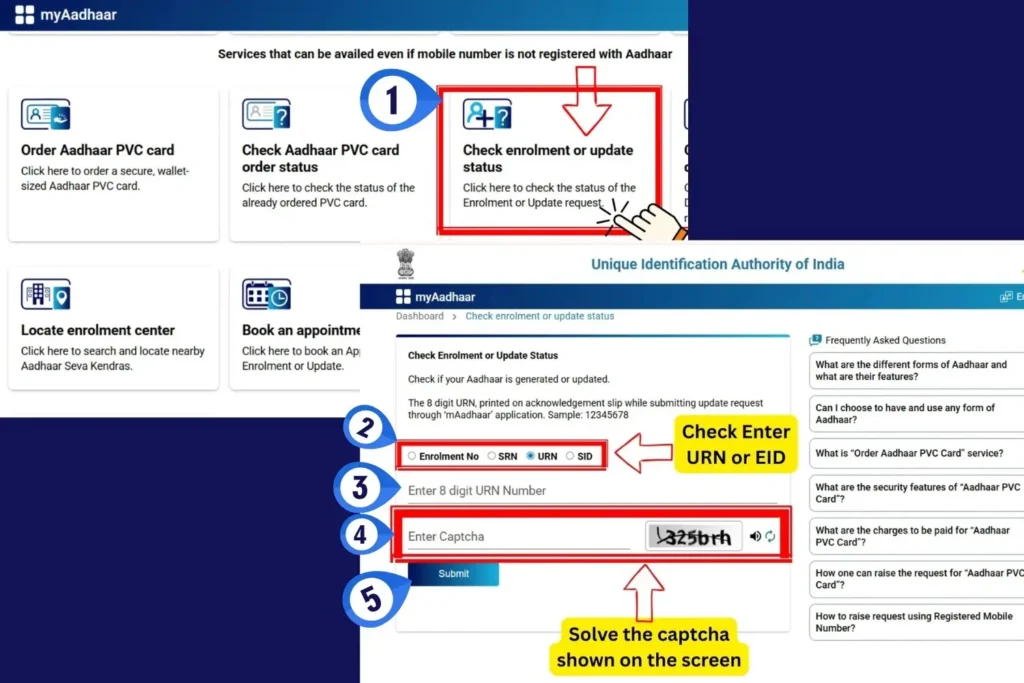
1. Track Aadhaar Status
You can check application status online using your Enrolment ID (EID):
- Go to: https://myaadhaar.uidai.gov.in/
- Select “Check Enrolment or Update Status”
- Enter:
- Your 28-digit Enrolment ID (EID) or URN/SRN/SID
- Captcha
- View processing status — normally 10 to 30 days, though delays may occur
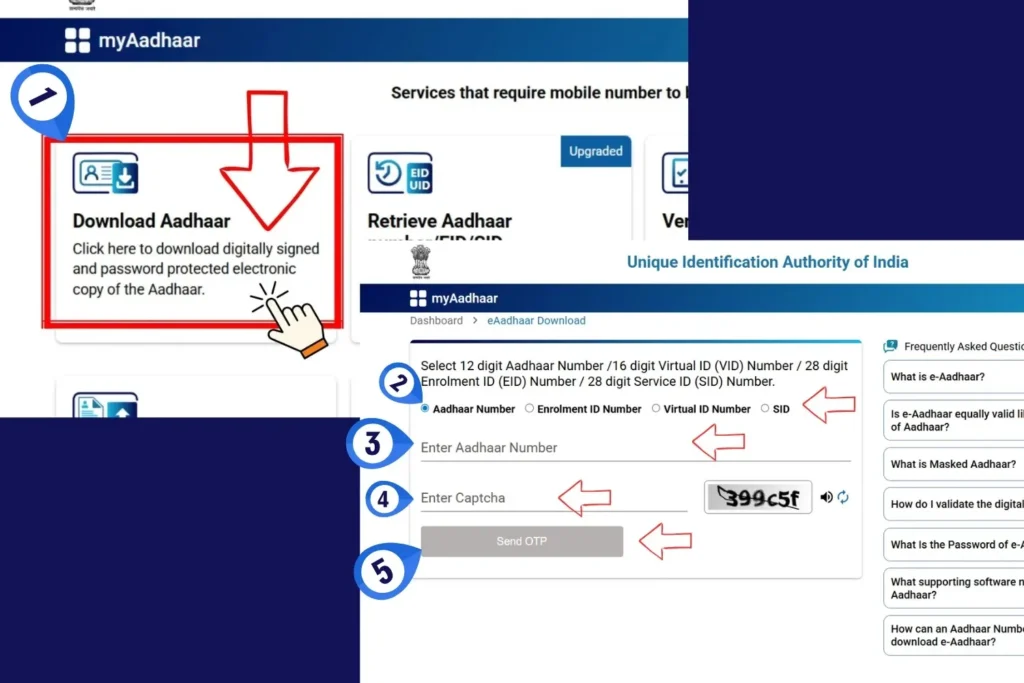
2. Download e-Aadhaar
After Aadhaar generation, download your digital Aadhaar copy:
- Visit the myAadhaar portal
- Select e-Aadhaar download option
- Enter Aadhaar/EID and verify OTP
- Download the secure PDF
Password format:
First four letters of your name in UPPERCASE + year of birth
Example: AVIN2002
e-Aadhaar is legally valid across digital platforms.
3. Order a PVC Aadhaar Card
- Request a PVC Aadhaar card online from the UIDAI portal
- Fee: ₹50
- Home delivery usually within 5 working days
- Ideal for durable, wallet-friendly usage
4. Update Aadhaar Details (If Needed)
You may update:
- Address
- Mobile number or Link with aadhaar card
- Other demographic details
Free until 14 June 2026 through the myAadhaar portal
Biometric updates at ASKs may involve a nominal fee and must be done in person.
Security Tips & Best Practices
Follow these safety checks to protect your Aadhaar and personal information.
Enrolment and demographic updates are free (PVC card and certain biometric updates may be charged).
Always visit UIDAI-authorized Aadhaar Seva Kendras (ASKs) or Permanent Enrolment Centres (PECs) to avoid fraud.
Never share your OTP, biometrics, or full Aadhaar number publicly or on untrusted websites.
Use Masked Aadhaar when sharing Aadhaar digitally to enhance privacy and reduce misuse risk.
Carefully review all details on the acknowledgement slip before leaving the enrolment centre.
For help or queries, contact the UIDAI helpline 1947 or email [email protected].